OBDResource
TPS10 Universal TPMS Relearn Tool - Tire Pressure Sensor Activation, Reset & Scan Tool (315/433 MHz)
TPS10 Universal TPMS Relearn Tool - Tire Pressure Sensor Activation, Reset & Scan Tool (315/433 MHz)
Couldn't load pickup availability
TPS10 Universal TPMS Relearn Tool for 315 MHz & 433 MHz Vehicles
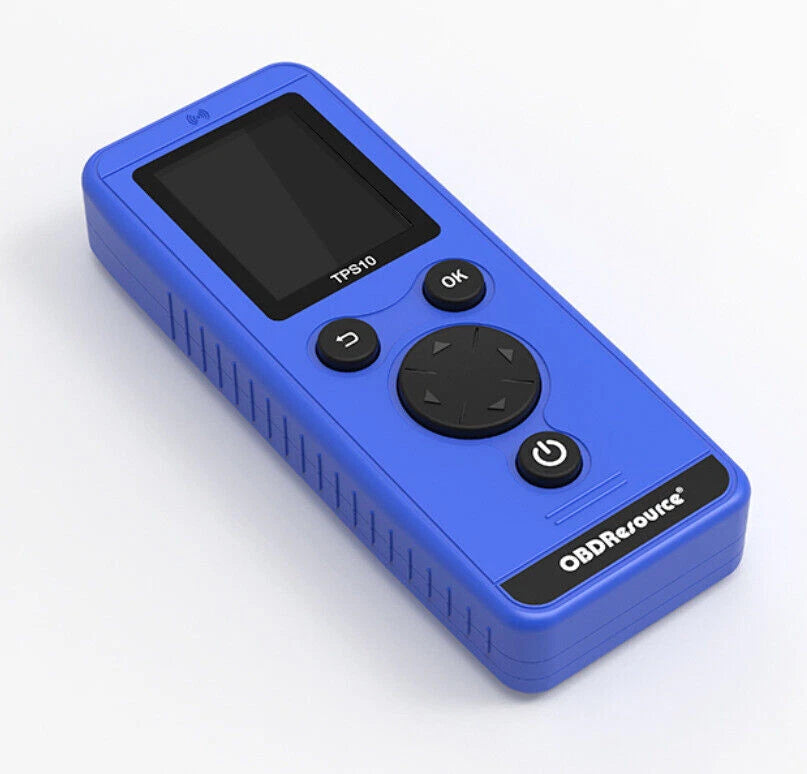
The TPS10 Universal TPMS Relearn Tool is a professional tire pressure sensor activation, reset, scan, and relearn tool designed for vehicles equipped with 315 MHz or 433 MHz TPMS sensors. With a built-in vehicle database, clear display, and guided relearn procedures, the TPS10 helps drivers, DIY users, repair shops, and tire service professionals complete TPMS service faster and more accurately.
Product Overview
The TPS10 is engineered to activate, reset, scan, and assist with relearning tire pressure monitoring system sensors. It is useful after tire rotation, TPMS sensor replacement, wheel changes, seasonal tire swaps, or when the TPMS warning light needs to be serviced after proper tire pressure and sensor checks.
Unlike simple one-button activators, the TPS10 includes an intuitive display interface that allows users to select the vehicle make, model, and year from the built-in database. Once the vehicle is placed into TPMS learning mode, position the TPS10 near the valve stem and follow the screen prompts to activate each sensor.
Universal TPMS Coverage
Designed for most vehicles using compatible 315 MHz or 433 MHz TPMS sensor systems.
Sensor Scan Function
Reads and displays TPMS sensor information to help confirm sensor response and status.
Guided Relearn Steps
Built-in vehicle menu helps guide users through make, model, year, and relearn procedure selection.
USB Software Upgrade
Supports software updates via USB to help maintain compatibility with newer vehicle models.
What the TPS10 Can Do
The TPS10 is designed as a more complete TPMS service tool for everyday tire pressure sensor maintenance. It combines activation, scanning, and guided relearn support in one compact handheld device.
- Activate compatible 315 MHz and 433 MHz TPMS sensors.
- Assist with TPMS relearn procedures after tire rotation or sensor replacement.
- Scan a single TPMS sensor and display sensor information.
- Guide users through vehicle-specific relearn procedures using the built-in menu.
- Help resolve TPMS warning light issues after proper tire and sensor service.
- Support professional garages, tire shops, fleet maintenance, and DIY vehicle owners.
Vehicle Compatibility
The TPS10 is designed for most passenger vehicles equipped with 315 MHz or 433 MHz TPMS systems. Common supported vehicle brands may include Chevrolet, Ford, Dodge, RAM, Jeep, Subaru, Toyota, Honda, Mazda, Nissan, Volkswagen, BMW, Mercedes-Benz, and many other compatible vehicles.
Important Compatibility Note: TPMS compatibility depends on vehicle make, model, year, trim level, sensor frequency, sensor type, and relearn procedure. Always select the correct vehicle information in the TPS10 menu and confirm your vehicle’s TPMS requirements before purchase.
| Recommended For | Most passenger vehicles with compatible 315 MHz or 433 MHz TPMS systems |
|---|---|
| Common Vehicle Brands | Chevrolet, Ford, Dodge, RAM, Jeep, Subaru, Toyota, Honda, Mazda, Nissan, Volkswagen, BMW, Mercedes-Benz, and more |
| Sensor Frequency | 315 MHz and 433 MHz |
| Main Functions | TPMS activation, reset support, sensor scan, sensor information display, relearn procedure guidance |
| Software Update | USB software upgrade support |
| Important Limitation | TPMS service procedures vary by vehicle. Some vehicles may require additional scan-tool functions or OEM procedures. |
When Do You Need This TPMS Tool?
A TPMS relearn or scan tool is useful when the vehicle needs to identify tire pressure sensors, confirm sensor response, or relearn sensor positions after tire-related work.
- After rotating tires and the vehicle needs to relearn sensor positions.
- After replacing one or more TPMS sensors.
- After installing new wheels or seasonal tire sets.
- When checking whether a TPMS sensor can be activated or scanned.
- When the TPMS warning light remains on after tire service.
- When a repair shop needs a compact TPMS tool for daily service tasks.
How to Use the TPS10 TPMS Tool
Always follow your vehicle owner’s manual or official service procedure. The exact relearn process depends on vehicle make, model, year, and sensor system. A typical process is:
Select Vehicle
Choose the correct vehicle make, model, and year from the TPS10 built-in menu.
Enter Relearn Mode
Put the vehicle into TPMS relearn or learning mode using the vehicle-specific procedure.
Activate Sensor
Hold the TPS10 close to the tire sidewall near the valve stem and trigger the sensor.
Follow the Sequence
Repeat the process for each wheel in the order shown by the vehicle or TPS10 instructions.
For best results, make sure the correct vehicle profile is selected, the vehicle is in TPMS learning mode, and the tool is placed close to the valve stem during activation.
Key Features
- 315 MHz / 433 MHz Support: Works with compatible TPMS sensor systems using common tire pressure sensor frequencies.
- TPMS Sensor Activation: Sends RF signals to wake up compatible tire pressure sensors during relearn.
- Sensor Information Display: Helps view sensor information during scan and diagnostic checks.
- Vehicle Database: Select vehicle make, model, and year for guided relearn support.
- User-Friendly Interface: Clear display, physical buttons, and easy menu navigation for shop or DIY use.
- Portable Design: Compact handheld format for garages, tire shops, toolboxes, and mobile service.
More Than a Basic Activator
The TPS10 is designed for customers who need more than a simple trigger tool. It combines sensor activation, single sensor scan, sensor information display, relearn guidance, and USB software upgrade support in one compact TPMS service tool.
Specifications
| Product Name | TPS10 Universal TPMS Relearn Tool |
|---|---|
| Product Type | TPMS relearn tool / tire pressure sensor activation tool / TPMS reset and scan tool |
| Supported Frequencies | 315 MHz and 433 MHz |
| Primary Functions | TPMS activation, reset support, sensor scan, sensor information display, relearn procedure guidance |
| Interface | Display screen with menu navigation and physical control buttons |
| Update Method | USB software upgrade support |
| Common Use Cases | Tire rotation, sensor replacement, wheel change, seasonal tire change, TPMS warning light service |
| Typical Users | DIY users, automotive technicians, repair shops, tire shops, fleet maintenance teams |
What’s Included
- 1 × TPS10 Universal TPMS Relearn Tool
- Basic TPMS activation, scan, and relearn support for compatible vehicles
- Packaging and included accessories may vary depending on production batch and inventory
Before You Buy
The TPS10 is designed to support TPMS activation, scanning, and relearn procedures for compatible vehicles. It is important to confirm your vehicle’s make, model, year, sensor frequency, and TPMS service requirements before purchase.
If you are unsure whether the TPS10 is suitable for your vehicle, contact us before ordering with your vehicle year, make, model, and current TPMS issue.
Frequently Asked Questions
What vehicles are compatible with the TPS10 TPMS Relearn Tool?
The TPS10 is designed for most passenger vehicles equipped with 315 MHz or 433 MHz TPMS systems. It supports a wide range of vehicle brands, including many Chevrolet, Ford, Dodge, RAM, Jeep, Subaru, Toyota, Honda, Mazda, Nissan, Volkswagen, BMW, Mercedes-Benz, and other compatible models. For best results, select your vehicle make, model, and year from the built-in menu and follow the on-screen relearn procedure.
Can the TPS10 program new TPMS sensors?
The TPS10 is mainly designed for TPMS sensor activation, relearn, reset support, sensor scanning, and relearn procedure guidance. It can help wake up compatible TPMS sensors and display sensor information, but it should not be treated as a universal blank-sensor programming tool unless the specific sensor and vehicle procedure clearly support that function.
Why is my TPMS sensor not responding during activation?
Common reasons include the vehicle not being in TPMS relearn mode, selecting the wrong vehicle make, model, or year, holding the tool too far from the valve stem, a weak or dead TPMS sensor battery, incompatible sensor frequency, aftermarket sensor compatibility issues, or a vehicle that requires a different scan-tool procedure. Make sure the TPS10 is close to the valve stem and follow the vehicle relearn sequence shown on the screen.
Trust & Support
EL50448 focuses on TPMS relearn tools, tire pressure reset products, TPMS sensors, and tire pressure service accessories. Our goal is to help customers choose the right TPMS solution and complete tire pressure sensor service with clear product information and responsive support.
Professional TPMS Service Made Easier
Choose the TPS10 if you need a universal TPMS relearn, reset, activation, and scan tool for compatible 315 MHz and 433 MHz tire pressure monitoring systems.
Share